

|
|
Article ID: 3382
Last updated: 04 Mar, 2026
For accounting periods starting on or after 1 April 2024, the merged R&D expenditure credit (RDEC) and enhanced R&D intensive support (ERIS) replace the old RDEC and small and medium-sized enterprise (SME) schemes. The two schemes and how to claim are explained below. Merged Research and Development Expenditure Credit (RDEC) schemeFor Corporation tax accounting periods beginning on or after 1 April 2024, a new merged Research and Development Expenditure Credit (RDEC) scheme is available for eligible trading companies of all sizes within the charge to UK Corporation Tax. For companies that do not meet the definition of R&D intensive SMEs, this ‘new’ RDEC will be the main method of obtaining relief for R&D. The ‘new’ merged RDEC scheme is similar to the ‘old’ RDEC scheme that was available to large companies and for R&D subcontracted to SMEs for periods prior to 1 April 2024. The key differences between the ‘old’ RDEC scheme and the ‘new’ RDEC scheme are as follows;
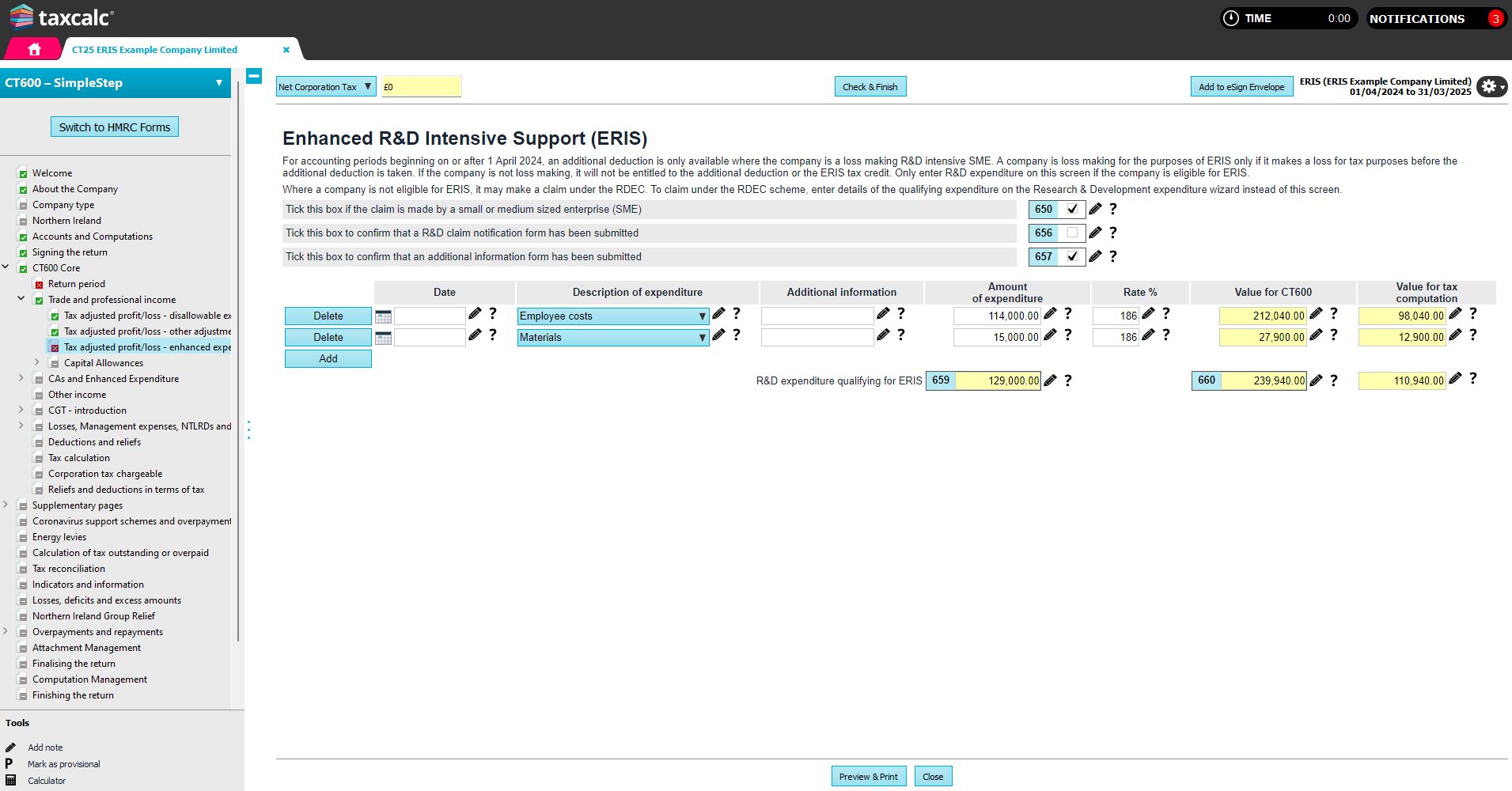
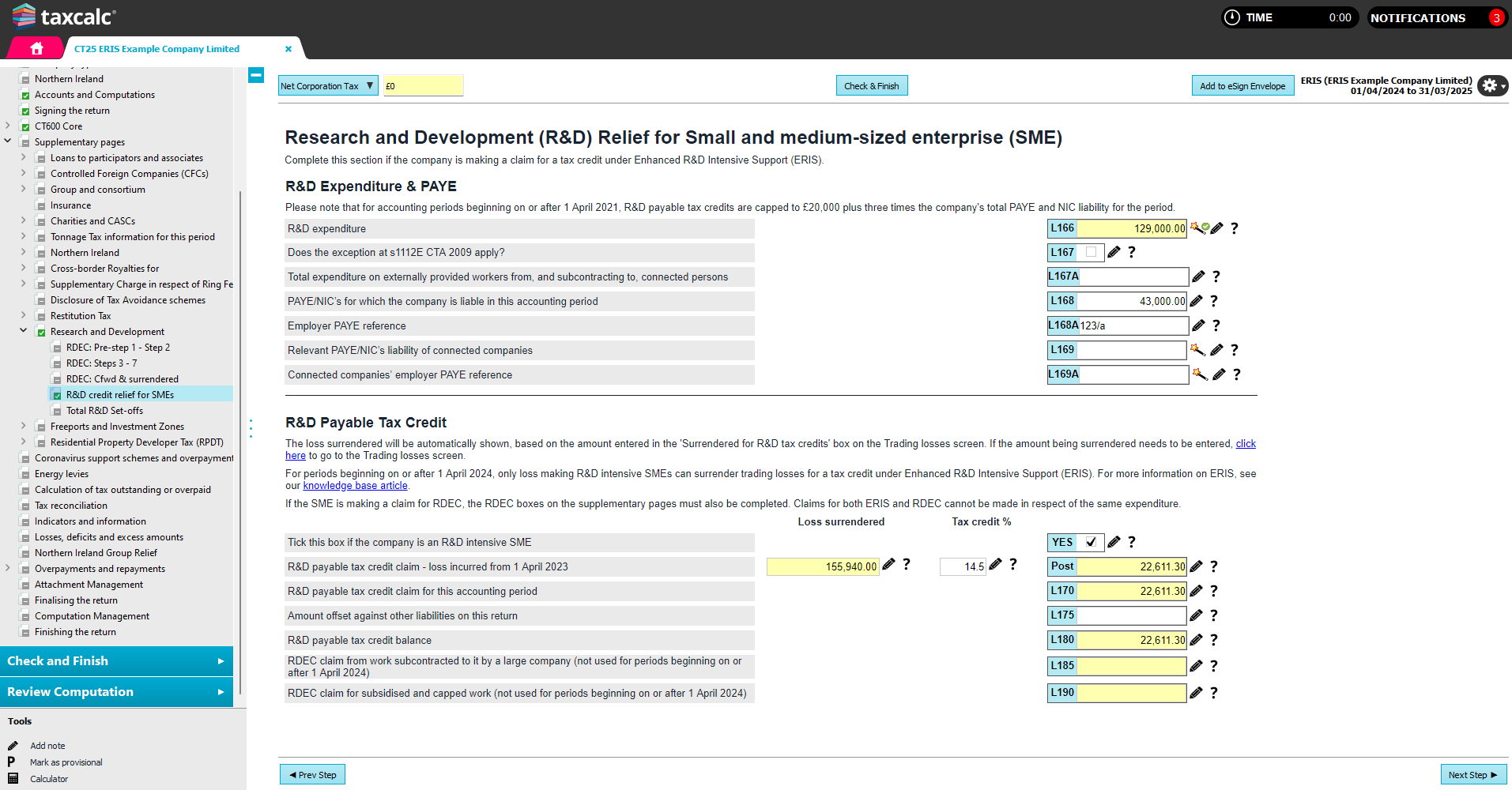
How to claim merged RDEC Whether you are using SimpleStep (Supplementary pages > Research and Development) or HMRC Forms mode (Research and Development), TaxCalc will guide you through HMRC's seven step process and provide wizards to help you. Pre-step 1 restriction Complete this section if you have an amount of Step 2 restriction (notional tax) brought forward from a previous accounting period or if you wish to include an amount of RDEC surrendered from other group companies. If you have a previous TaxCalc return, box L5 will be populated with the value in box L140 from the previous year. Step 1 R&D expenditure on which RDEC is claimed in this accounting period can be entered using the wizard. The expenditure will be multiplied by 20%. Step 3 amounts from a previous accounting period is referring to any restriction to the previous year credit, due to the PAYE thresholds. This amount, unlike the notional tax restriction, can be used within the current year RDEC calculation. The total credit is used to discharge any corporation tax liability for the accounting period. The liability is not reduced by the credit but is settled by it like any other payment made by the company. In other words, you will not see a change to the calculated tax liability for the year. Step 2 If you have RDEC remaining after step 1, the amount is reduced by applying a notional tax charge to it. The notional tax charge is based on the applicable rate of Corporation Tax for the accounting period. This step restricts the potential payable element and ensures that loss makers receive the same net benefit as profit makers (the credit being taxable). This ensures that the total cash benefit for all claimants is equal to the expenditure credit, net of tax at the applicable rate of corporation tax. The ‘notional’ tax retained under this step is carried forward and available to reduce the corporation tax liability of a later period of the company. Credit amounts brought forward from a previous period are not liable to a further notional tax deduction. Step 3 This step further restricts any payable element to three times the company’s total expenditure on R&D workers’ PAYE and NIC for the accounting period, plus £20,000 (unless exemption applies). The amount which exceeds the cap is carried forward and added to any expenditure credit for the following accounting period. Step 4 Any amount remaining after step 3 is used to discharge any outstanding corporation tax liabilities of the company (due but not settled), for any other accounting periods. Step 5 If the company is a member of a group, it may surrender the whole or any part remaining after step 4 to any other group member. Step 6 Any amount remaining after step 5 is used to discharge any other liability of the company to pay a sum to the Commissioners, for example VAT or liabilities under any contract settlement. Step 7 The final amount remaining is payable to the company provided that the company is a going concern. L123 should only be completed if the amount is not payable under the going concern rules (s104S (2)(b) CTA 2009. The resulting payable amount will also be automatically populated in box 880 of the CT600. The RDEC amount is an ‘above the line’ expenditure credit, which is taxable trading income of the company. If this amount has already been included in the company’s profit or loss then no further adjustment is required, however if the RDEC has not already been included in the company’s profit or loss then an adjustment should be entered using the Taxable Research and Development Expenditure Credit (RDEC) box on the Tax adjusted profit/loss – enhanced expenditure adjustments screen. Enhanced R&D Intensive Support (ERIS)Where a company is a loss making R&D intensive SME, it may claim relief under the Enhanced R&D Intensive Support (ERIS) scheme instead of the RDEC. Eligible companies may choose to claim under either RDEC or ERIS. Under ERIS, eligible companies may deduct an extra 86% of qualifying costs in calculating their trading loss and claim a payable tax credit of up to 14.5% of the surrenderable loss. Unlike the RDEC, the payable ERIS tax credit is not taxable. This operates in a similar way to the SME R&D scheme for periods prior to 1 April 2024. To qualify, the company must be a Small or Medium sized enterprise (SME), meet the R&D intensity condition (relevant R&D expenditure is at least 30% of its total relevant expenditure) and incur a loss for tax purposes before the additional deduction is taken. How to claim ERIS The starting point for entry can be found in CT600 Core > Trade and professional income > Tax adjusted profit/loss - enhanced expenditure. By using the wizard next to the box 'Enhanced R&D Intensive Support (ERIS), the qualifying expenditure will be enhanced automatically and the relevant entries made in the core return: 1. Indicate that the company meets the qualifying conditions by selecting the option ‘Tick this box if the company is an R&D intensive SME’ on the R&D credit relief for SMEs screen in Simple step. You will also be prompted to tick the claim notification and additional information form boxes where necessary. 2. Enter qualifying R&D expenditure in the Enhanced R&D Intensive Support (ERIS) wizard. The additional 86% deduction will be calculated and deducted in the trading profit calculation.
3. Enter the loss to be surrendered as ‘Surrendered for R&D tax credits’ on the Trading losses screen. The maximum loss that can be surrendered is the lower of the remaining trading loss available and the total enhanced R&D expenditure. You will be prompted to click on the link to complete the SME section of the CT600L. 4. Ensure that the relevant details are completed on the Research and Development (R&D) for Small and medium-sized enterprises (SME) section of the Research and Development supplementary pages (Page 4 of the CT600L or the R&D credit relief for SMEs screen in Simple step).
This article was:
|
||||||||||


 Cookie Settings