|
|
Article ID: 2314
Last updated: 11 Jun, 2026
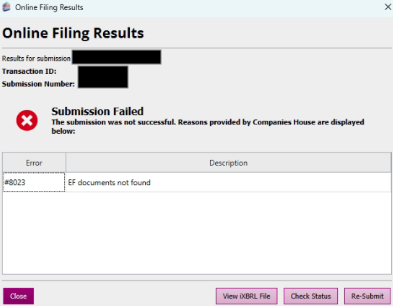
You may receive this message if you check for the response too quickly after the submission has been processed. We recommend that you click on Check Status an hour after the submission has processed. This problem should be resolved if you select 'Check Status' on the Online Filing Results for the original submission which will currently be displaying a status of 'Transaction error'. See below example:
Alternatively this message can appear if Companies House are having problems with their system. It may be worth checking https://www.gov.uk/government/organisations/companies-house/about/about-our-services#service-availability-and-planned-maintenance to see if anything has been reported. If the issue persists, Please send TaxCalc Support a copy of the XML file that goes to Companies House during online submission. To do this, please follow these steps so that we can investigate your issue accordingly.
Support should then be able to assist in troubleshooting the issue.
This article was:
|